VTENext online, but invisible to anyone who shouldn't see it

Sales agents want the CRM on their phone, the ERP has to sync orders, the website has to send in leads. Meanwhile thousands of scans a day arrive from the Internet looking for exactly this: a PHP application with a forgotten configuration file. This is how we protected VTENext with Neti without changing the CRM, and why the same approach works for everything else too.
The CRM is where a company keeps what really matters: customers, deals, quotes, tickets, documents. It is also the application everyone wants to reach from outside. The agent visiting customers, the technician on the road, the branch office, the partner looking after the installation.
The quickest route is to publish VTENext on the Internet with a certificate and a good login, and it is also the riskiest. Anyone who installs VTENext knows this well, because sooner or later every customer asks the same question: "the CRM is on the Internet, are we safe?".
To answer it we took a typical installation, crm.companydomain.com with its test environment crmstaging.companydomain.com, and put it behind Neti Pro with every layer switched on. The screenshots come from the environment where we reproduced the setup and the hostile traffic we see every day on the sites we protect.
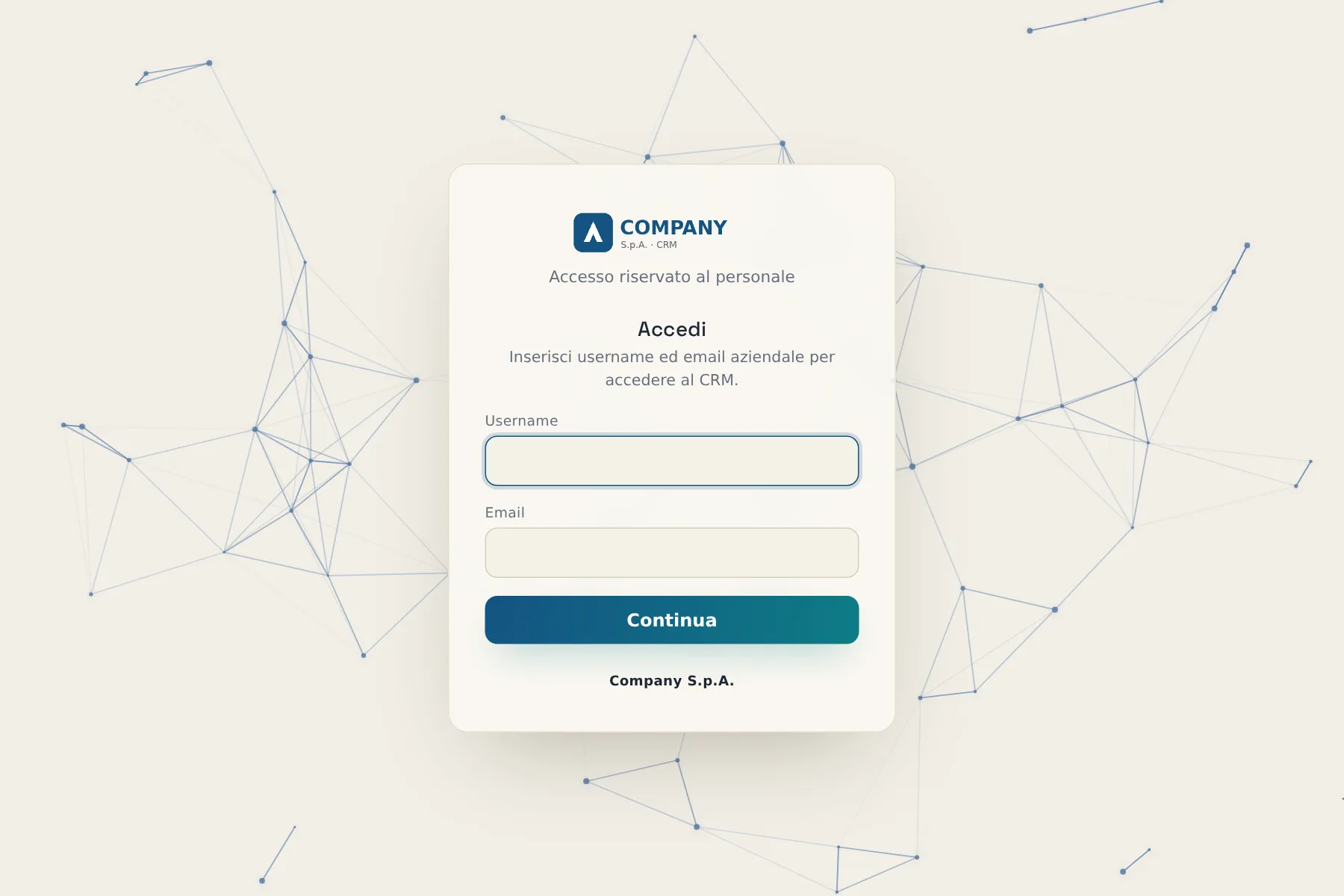
Anyone who opens crm.companydomain.com without being authorised sees this page, not VTENext.
What actually hits an exposed application
VTENext is a rich application and, like every PHP application of its kind, it has a lot of doors: hundreds of files reachable by URL, webservice.php, the web forms for leads, folders such as storage/, logs/ and user_privileges/ that should never leak, third party libraries under vendor/. Updates are often handled by the partner, on their own schedule.
To see what knocks on those doors, just read the logs. On an e-commerce site we protect we counted about 65,000 requests in ten days, and more than 12,000 got a 403 or a 404. Almost all of them were automated scans. They were after .env files in some thirty variants, AWS and Docker credentials, forgotten repositories (/.git/config alone showed up 79 times), diagnostic pages such as phpinfo.php and server-status, xmlrpc.php more than 300 times, and ready made exploits for popular PHP libraries such as the well known phpunit/eval-stdin.php. In the same period CrowdSec raised 50 alerts on that site alone.
None of these scanners knows there is VTENext behind the address. They try everything on everyone, and a config.inc.php.bak left lying around is all it takes for a blind attempt to succeed.
The architecture: VTENext stays as it is
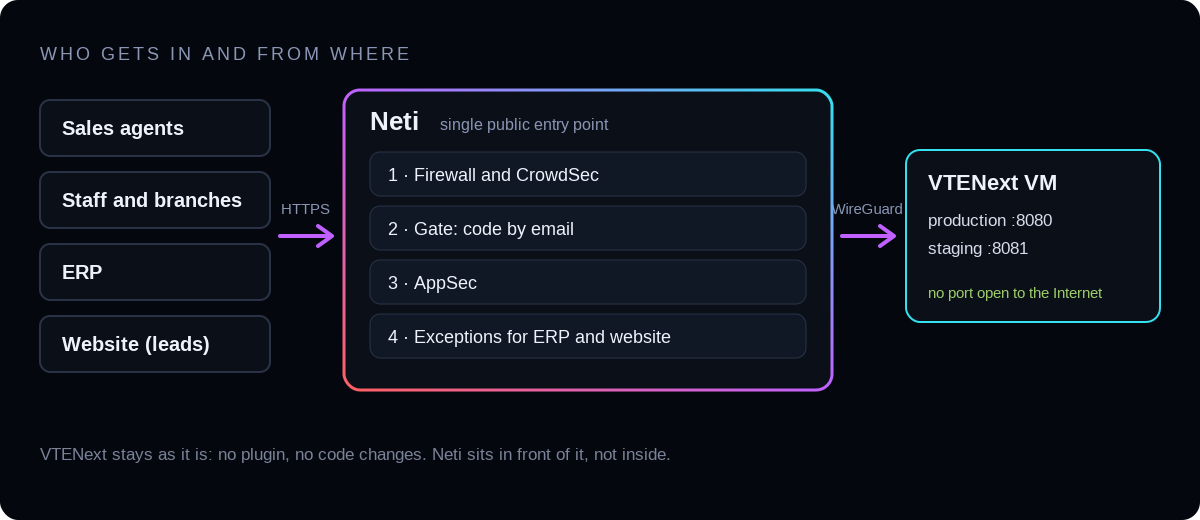
We put Neti on a Debian VPS as the single public entry point. VTENext runs on a separate VM and has no port open to the Internet: only Neti can reach it, over a WireGuard tunnel or the internal network. Neti handles HTTPS with Let's Encrypt certificates that renew themselves, then applies its controls one after the other.
For anyone installing VTENext this is the key point: nothing changes on the CRM. No plugin, no module, no code patch. The vendor keeps updating it as usual and no customisation breaks.
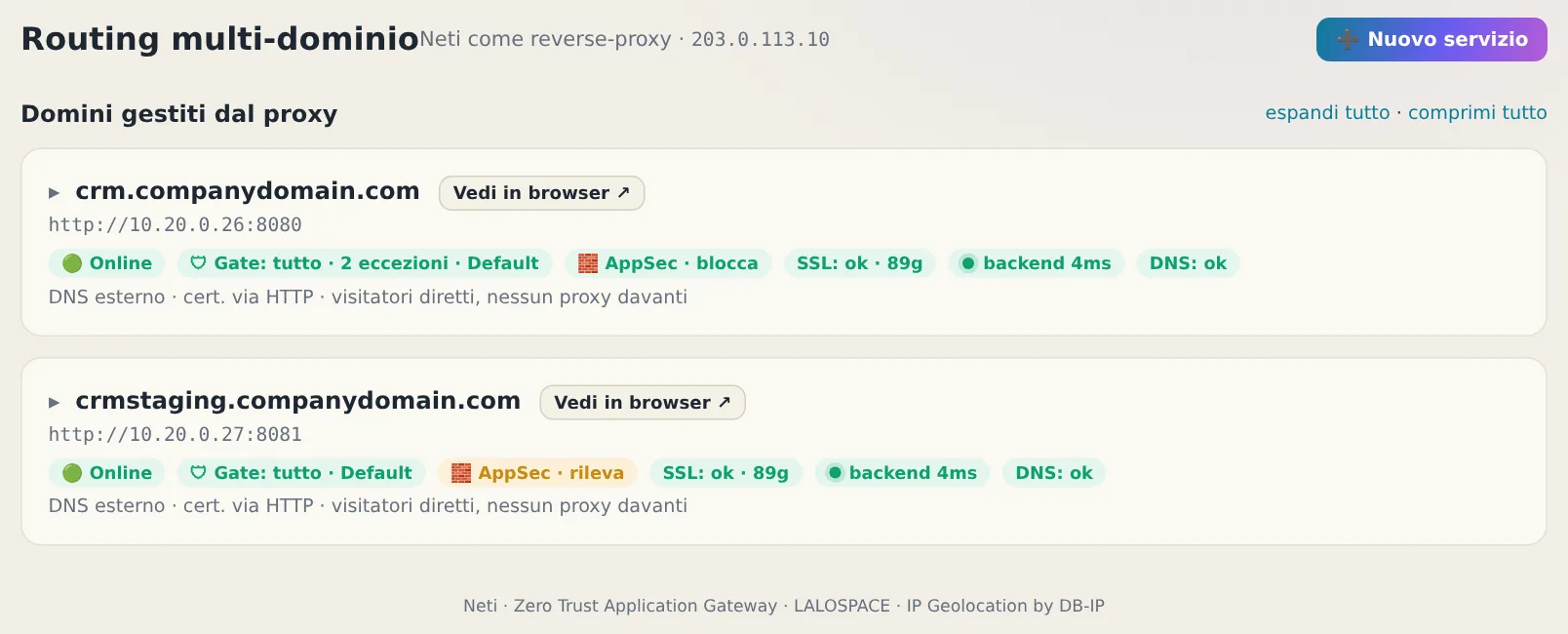
Production and staging as two separate services: gate on the whole service, AppSec blocking on production and detecting only on staging.
How we give agents access
This is where it differs from a CRM that is simply published. With the gate on for the whole service, anyone arriving without a valid session is sent to the Neti access page, with the company's logo and wording. The agent enters a username and company email. If the pair is on the service's list, they get a one time code by email, type it in, and only then do their requests reach VTENext, where they log in as usual.
Before sending the code, though, Neti decides whether to trust whoever is knocking. Every address gets a risk score that takes into account the country, datacenter and VPN networks, behaviour, history and CrowdSec decisions. An agent connecting from a hotel in Bologna gets the code within seconds. An address coming from a datacenter network on the other side of the world, with a session never seen before, ends up instead on a decoy page that never lets anyone in and records every attempt.
In practice, managing agents takes very little:
- a named list with username and company email, separate for each service;
- no VPN to install on phones and laptops: the agent opens the browser, gets the code and is in;
- a stolen password is not enough, because the company mailbox is needed too;
- when an agency contract ends, the agent is removed from the list and access closes at once, even before the user is disabled in VTENext;
- offices and branches are trusted networks: people working from there go through without a code and are never banned, so a colleague who gets it wrong three times does not lock out the whole office.
Staging has its own list: IT, the partner's contact person, the system integrator's technician. Production has the staff and the agents. Everyone sees only what they need.
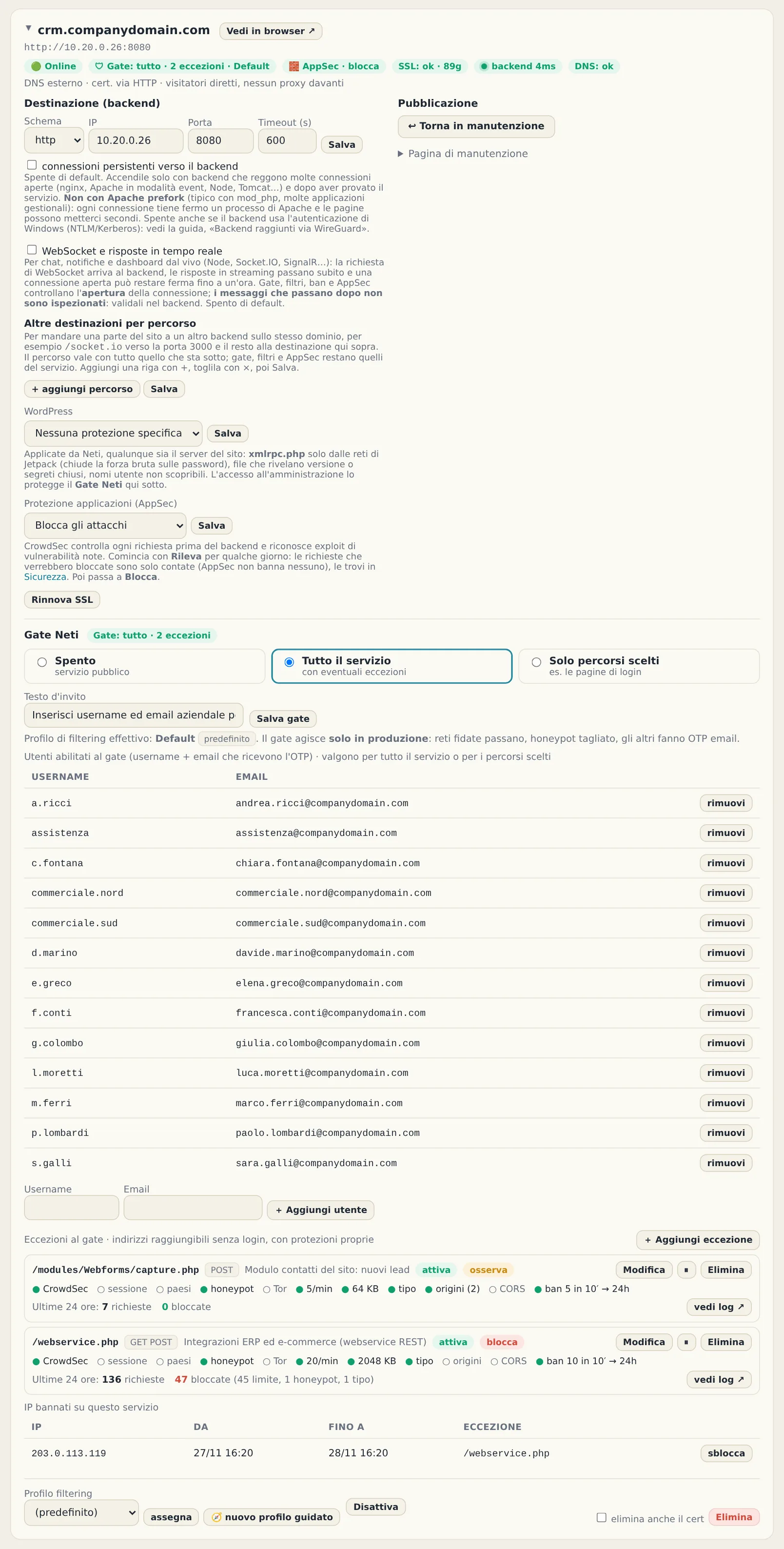
The service page: a backend with a 600 second timeout so that long VTENext reports are not cut off, AppSec, the gate with its 13 users, the two exceptions and the banned addresses.
The security effect is clear cut. Vulnerabilities that can be exploited without logging in, a forgotten backup file, a test script left on the server: nobody can reach them from the Internet, because the gate comes first. The VTENext login is not exposed to brute force, because anyone who does not get past the gate never even sees it. In our environment every scan (.env, .git, config.inc.php~, crm.sql, SQL injection in the URL, path traversal) stopped at the gate. Not a single hostile request reached VTENext.
ERP and website: integrations without a browser
A CRM does not live on its own. In our case the ERP syncs orders and customer records through webservice.php, while the company website sends new leads through the VTENext web form (modules/Webforms/capture.php). Neither of them can read a code from an email, so Neti opens only those two addresses, each with its own rules.
For the web service we allowed GET and POST, form or JSON, up to 2 MB per request and at most 20 requests a minute, with bursts of 10. Ten rejections in ten minutes mean a 24 hour ban.
For the lead form the rules are tighter: POST only, form only, at most 64 KB, 5 requests a minute with bursts of 3, and only when the request comes from www.companydomain.com. Five rejections in ten minutes are enough for a 24 hour ban.
Every exception starts in Observe mode: Neti records what it would have rejected without actually rejecting it. After a few days of clean logs we switch it to Block. That way no integration breaks on day one and the rules are based on real traffic, not guesses.
After the gate: AppSec also checks those already inside
The gate stops anyone who is not authorised. But what if a valid session ended up in the wrong hands, for example on a laptop infected with malware?
That is what AppSec is for. CrowdSec inspects every request that has passed the gate, before it reaches VTENext, and recognises exploits of known vulnerabilities. It works like a virtual patch, with a rule for every CVE actually being exploited in the wild, updated daily, which also protects the libraries VTENext ships with while the update is still on its way. And it blocks the files that must never leave the server, such as .env, .git and .svn, whoever asks for them.
We put it to the test by using a user's session from a new address to request .env, .git/config, .svn/wc.db, the PHPUnit exploit (CVE-2017-9841) and the PHP-CGI argument injection (CVE-2024-4577). Five requests, five 403s. None reached VTENext and CrowdSec banned the address straight at the firewall.
On staging AppSec stays in Detect mode: requests that would be blocked are only counted. It is the ideal test bench for every VTENext update, because you see straight away whether a new version makes calls that the rules would mistake for attacks, before taking it to production.
Bans that get longer for those who insist
Once someone is banned they stop talking to the server, at firewall level. In our environment, within a few minutes, the firewall was already dropping 18 addresses seen on that service: scanner User-Agents, searches for sensitive files, PHPUnit exploits, exceeded limits, exception rules.
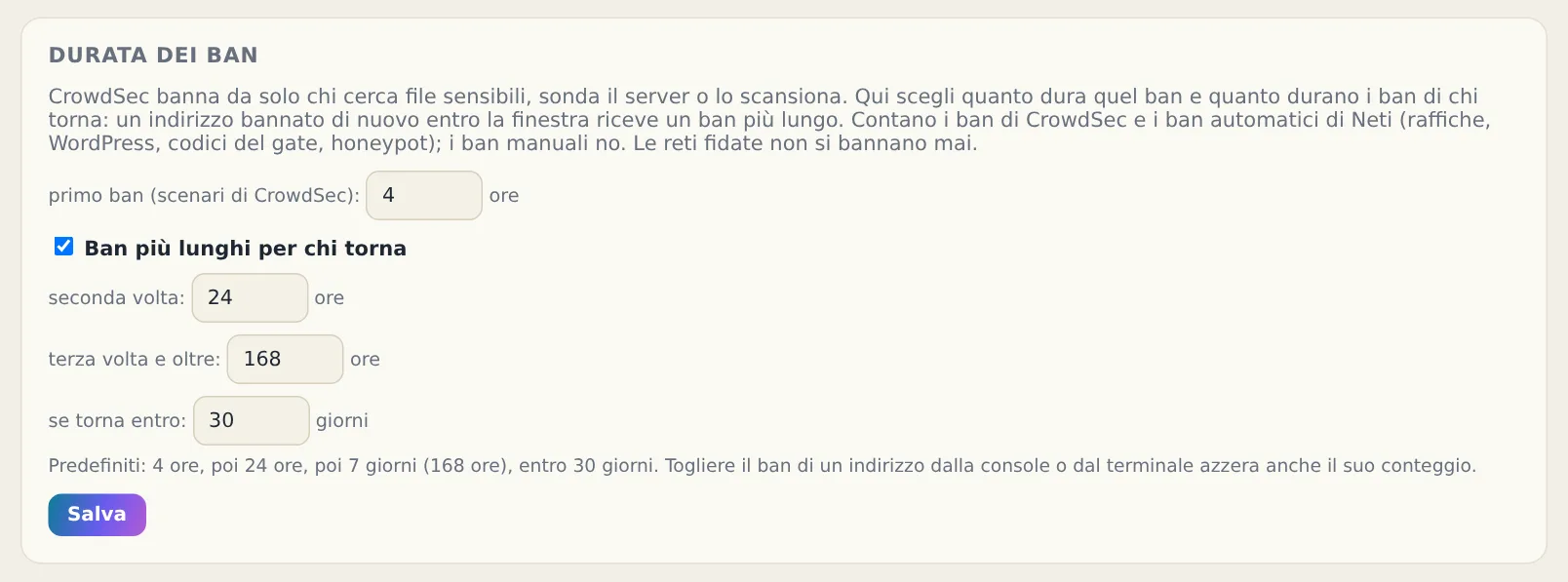
Whoever comes back after a ban gets a longer one: 4 hours the first time, 24 hours the second, 7 days from the third.
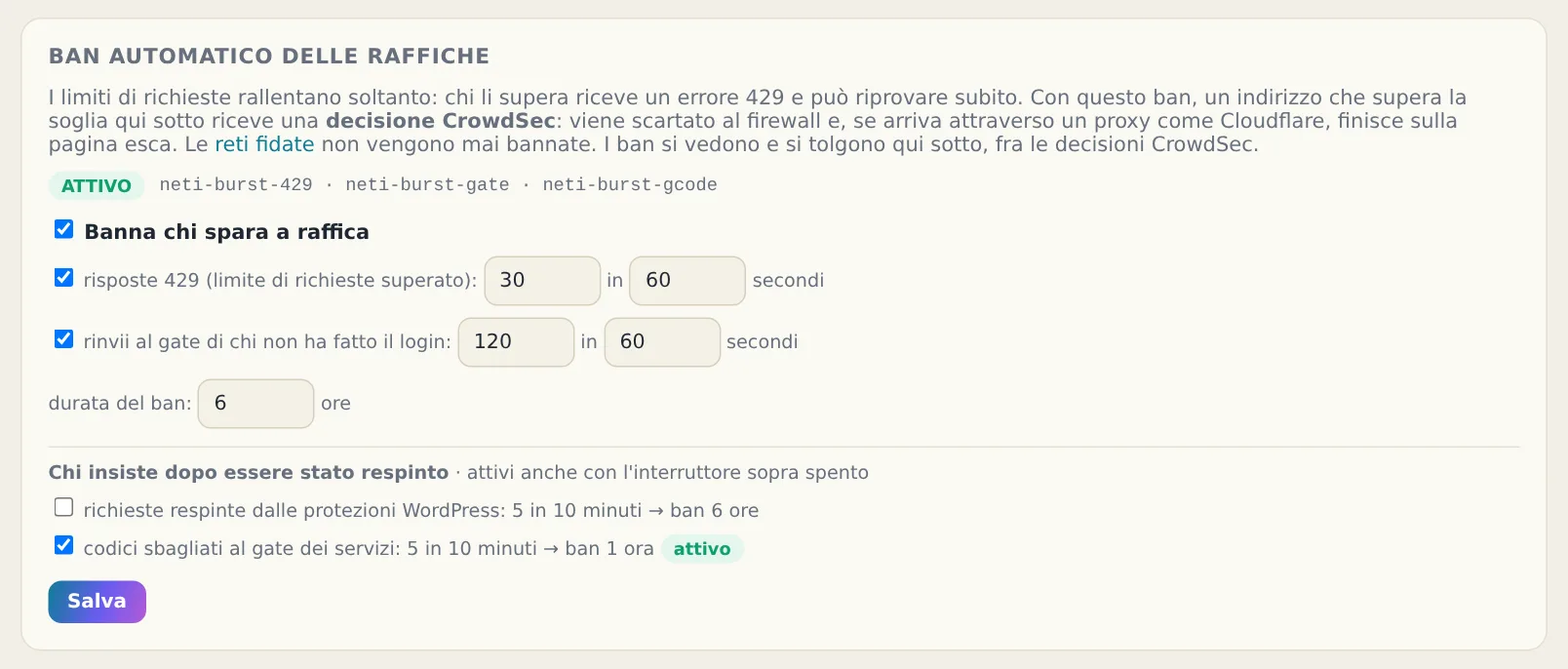
Bursts (too many 429s or too many redirects to the gate) and repeated wrong codes are banned even when they do not match a CrowdSec scenario.
We saw it on the web service too. One address tried to guess the credentials with a burst of logins: after a few requests it was getting nothing but 429 and was banned twice, by the exception rule and by the automatic burst ban. At the same time the ERP kept syncing quietly, with its 200 responses.
How we check that every control works
Telling a customer "you are protected" is easy. Proving it is another matter, and that is where Neti makes the difference for installers.
We verify every installation in three ways. First we attack the service ourselves, with the same requests we see in real logs: scans for sensitive files, SQL injection, path traversal, known exploits, login bursts on the web service, a valid session used from a new address. Then we look at where each request stopped. Finally we keep exceptions and AppSec in observation for a few days, until the logs show that all legitimate traffic gets through and hostile traffic does not.
To look, we use Live analysis, which draws the path requests take on a service: Internet, firewall, limits, gate, AppSec, service. For each layer it shows how many requests went through and how many were stopped, and one click shows who, with which request and why.
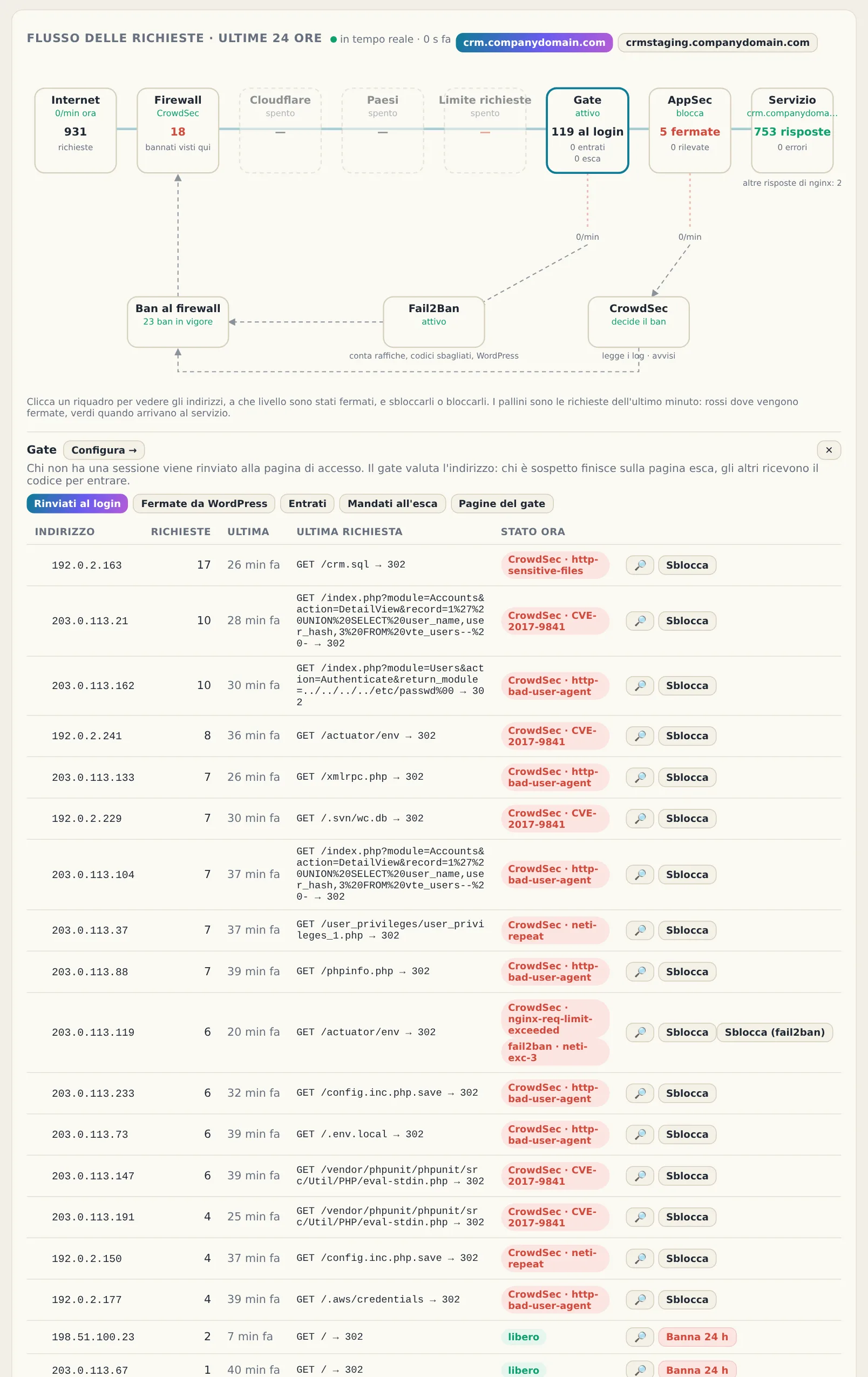
The last 24 hours of crm.companydomain.com: 119 visitors without a session sent to the login, 753 CRM responses to staff. Below, the addresses stopped at the gate, with the requests they tried (/crm.sql, SQL injection in the URL, /etc/passwd, /actuator/env, /.svn/wc.db) and the CrowdSec ban that stopped them.
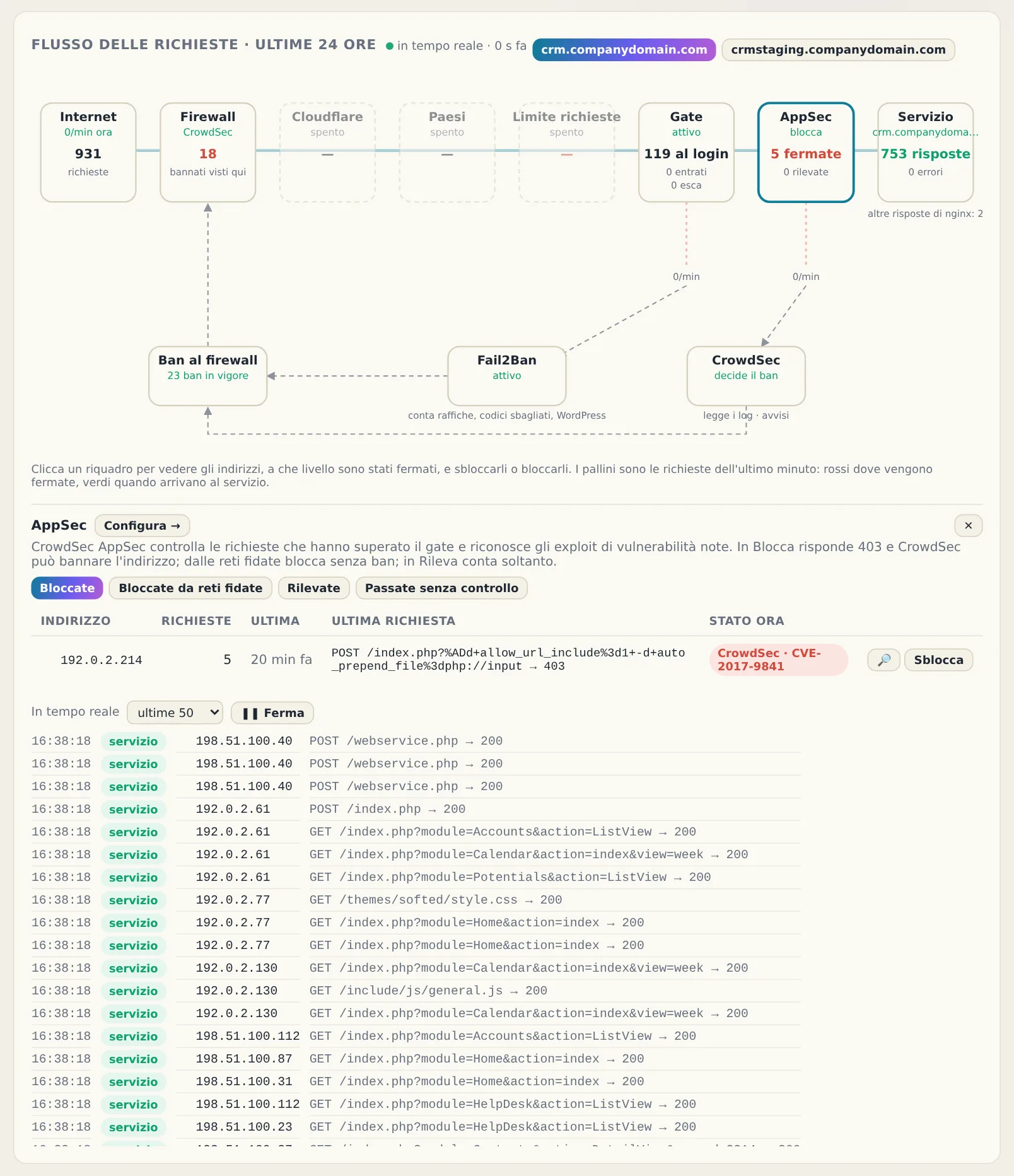
The AppSec panel: the session used to try the exploits, stopped with a 403 and banned. Below, in real time, normal traffic: the ERP on the web service, staff on the CRM modules.
It is also an everyday working tool. When the customer calls because "the ERP has stopped syncing", within seconds you can see whether the requests are arriving, at which layer they stop and why. On top of that there are sensors on the tunnel, on the production and staging backends and on certificate expiry, which send an email alert before the customer notices anything.
And not just VTENext
Nothing you have read here depends on VTENext. Neti sits in front of any web application, and a single Neti can publish several services, each with its own gate, its own list of people, its own exceptions and its own AppSec level.
The e-commerce site the opening numbers come from is protected this way. In the same way you can put behind Neti the customer portal, the document management system, the WordPress admin, or the interface of an industrial plant that should never sit openly on the Internet (we covered this when writing about the attack on French supermarket refrigeration systems). For the customer little changes: one access page with their branding, one list of people to keep up to date, one console to see what is going on.
Then there are the things you need that are already included. The maintenance page with the company's branding switches on with one click during updates, so nobody gets into the CRM halfway through. The configuration is backed up encrypted, also to S3 or SFTP off the server. And Neti itself is locked down: console on a random port and path, password plus email code, SSH limited to chosen addresses, automatic security updates and every action logged.
Why it pays off for VTENext installers
For a system integrator Neti is added to the installation without getting inside it. CRM updates stay as they were, and so do customisations. The customer's question can finally be answered with facts: "only the people on the list can see the CRM, everything else stops before it, and I can show you in Live analysis". Integrations with ERP, e-commerce, web forms and apps go through exceptions with limits and bans, without opening up the whole CRM to make them work. Staging becomes a real test environment, with its own users and AppSec in detection. And several customers and applications can be managed from a single point.
Our checklist
- Neti on a Debian 13 VPS or VM with a public IP, VTENext on a separate VM reached over WireGuard or the internal network and with no ports open to the Internet.
- One service for production and one for staging, with a long timeout (600 seconds) for reports and exports.
- Gate on the whole service, with a named list of staff and agents, company email, branding and invitation text.
- Exceptions only for integrations (
webservice.phpand the web form), with limits, content types, origin and bans. Observe first, then Block. - AppSec in Detect for a few days, then Block on production. Staging stays in Detect.
- CrowdSec with escalating bans, automatic bans for bursts and wrong codes, offices and branches as trusted networks.
- A filtering profile with the countries staff and agents actually work from, and penalties for datacenters and VPNs.
- Sensors on tunnel, backends and certificates, encrypted backup off the server.
- Test attacks and Live analysis open during the first days, to see what arrives and fine tune exceptions and limits.
If you install VTENext for your customers and want to see this setup live, get in touch: we will show it to you on a test installation.
Domain names, users and IP addresses in the screenshots are examples (the IPs come from the ranges reserved for documentation). The hostile traffic reproduces requests observed on a production site protected by Neti, adapted to a VTENext installation. VTENext is a trademark of its respective owners and this article is not affiliated with the vendor.